
立即試用 DWG FastView 的比較工具
適用於 Windows 的 DWG FastView has some great comparison tools. These tools help you find differences between two 繪畫s easily. Let’s take a look at them.
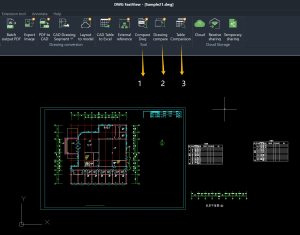
圖紙繪圖 Data Comparison
Pick two 繪畫s. This tool checks their data 和 shows differences with different 顏色s. It’s simple to see what’s changed, added, or re移動d.
圖紙繪圖 Appearance Comparison
Choose two 繪畫s和 這 tool turns them into pictures. It then shows you the visual differences between the two pictures. 您可以 clearly see how they look different.
Table Comparison
CAD製圖s often have tables. This tool compares two tables to find data differences. It’s easy to spot w這裡 numbers or words are not the same.
All three comparison tools are paid features. But don’t worry – you can try them for free for 10 minutes every day. These tools can save you lots of time when checking 繪畫s. Whether you’re a designer, engineer, or anyone working with CAD files, they’ll make your work much easier. 
如果您現在使用的是手機,您可以在下方輸入您的電子郵件,您將收到 Windows 版本的下載連結;如果您已經安裝了免費的手機版本,只要按一下升級按鈕,即可解鎖手機版本的所有功能並移除所有廣告。無論您在 Windows 或手機上訂閱(谷歌播放 或 的iOS appstore)、

📥 Apply for PC Download Link from Mobile Phone
Reading on your phone? Enter your email address below and we will immediately send the DWG FastView for Windows download link to your inbox.
相關文章推薦
讀者留言與技術討論
✍️ 發表您的留言
您的電子郵件地址絕不會被公開顯示。標有 * 的欄位為必填項。