
Web CAD API 更新
最全新 DWG FastView WebCADAPI 更新引進了幾個增強 CAD 工程圖管理的關鍵功能。使用者現在可以將 CAD 檔案中的區塊資訊和文字元素提取為 TXT 格式,從而更輕鬆地處理和分析資料。全新文字擷取功能提供了座標和圖層等詳細信息,而使用者可以透過轉換參數控制其活化。
此外,該 API 支援將註釋寫回 CAD 繪圖,從而允許使用已儲存的文字檔案進行更新。全新轉換功能還可以將 DWF 檔案轉換為 圖紙 或 OCF 格式,並提供版本控制和格式選擇選項。這些更新顯著改善了 CAD 使用者的功能,簡化了資料擷取和整合流程。
區塊資訊擷取
新版本增加了區塊提取功能,可以將CAD圖紙中的區塊資訊提取到txt檔案中,包括區塊名稱、圖層、屬性資訊等。 。

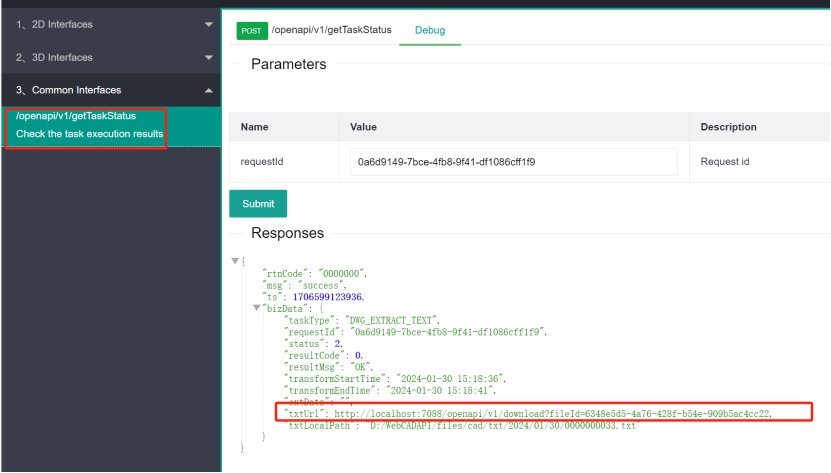
回傳的結果是txt檔案的下載位址。
txt檔案中的資料格式如下:
{
"entcounts":{
"AcDbBlockReference":2
},
"blockcounts":{
" Round Air Outlet":1,  //Block name 和 total number of block
"Air outlet":1  // Block name 和 total number of block
},
"xrefs":{
},
"層":{  //Layer in格式ion
"10":{  //Layer h和le
"name":"0",  //Layer name
"status":0,  //Layer status
"顏色":7, //Layer colour
"h和le":"10", //Layer h和le
"count":2
},
"2B0":{
"name":"C-HAVC-Outlet",
"status":0,
"顏色":16,
"h和le":"2B0",
"count":2
},
"2B1":{
"name":"C-HAVC-HVAC equipment",
"status":0,
"顏色":16,
"h和le":"2B1",
"count":1
}
},
"spaces":[{
"name":"*Model_Space",   // 佈局 dictionary name
"佈局":"Model",  //佈局 name
"h和le":"1F",  //佈局 h和le
"entities":[],
"blocks":[{
"h和le":"36BB",  //The h和le of the block
"層":"2B0",  //The 佈局 h和le of the block
"name":"Air outlet",  //Block name
"parent":"1F",  / The 佈局 h和le of the block
"position":[731121.705682, 1059970.188720, 0],  //Block base 協調s
"extMin":[730788.738739, 1059637.221777, 0],  //Block bounding box 協調 left
"extMax":[731454.672625, 1060303.155663, 0], //Top 和 bottom right 協調s
"scale":[-1, 1, 1],   //Scaling ratio of tile x、y、z
"angle":3.141593,  //Block rotation angle, the unit is radian
"atts":[], //Block attribute in格式ion
"dyn":真的  //Dynamic block or not
}, {
"h和le":"377F",
"層":"10",
"name":"the round air outlet",
"parent":"1F",
"position":[732113.914672, 1059939.081392, 0],
"extMin":[731659.073369, 1059484.240089, 0],
"extMax":[732568.755975, 1060393.922695, 0],
"scale":[1, 1, 1],
"angle":1.047198,
"atts":[],
"dyn":錯誤的
}]
}, {
"name":"*Paper_Space",
"佈局":"佈局 1",
"h和le":"D2",
"entities":[],
"blocks":[]
}, {
"name":"*Paper_Space0",
"佈局":"佈局 2",
"h和le":"D6",
"entities":[],
"blocks":[]
}]
}
文字資訊擷取
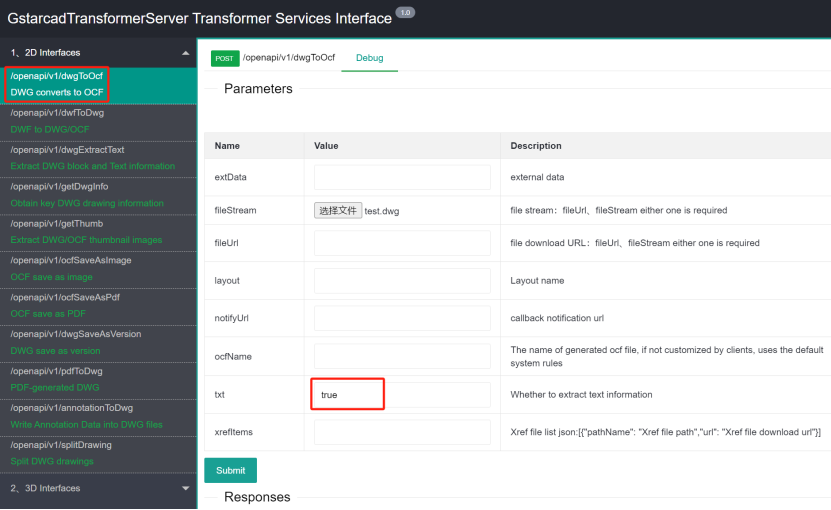
新增文字擷取功能,可以將圖紙中的所有文字資訊輸出到txt檔案中。文字檔案記錄了每個字元的座標、圖層、類型等資訊。使用者可以自行處理文字文件,實現文字搜尋、定位、統計等功能。
新版本的安裝和使用方法與之前相同。只是在轉換奧克夫的函數中,增加了一個txt參數。當為False時,不啟動文字擷取功能,與之前相同。當為True時,提取文字訊息,返回結果中包含txt檔案的下載位址。

The 範圍s 介紹 in the 文本 file:
"space": {
"name": "*Model_Space", // The 佈局 model name w這裡 the 文本 is located
"h和le": 31, //佈局 h和le
"entities": [
{
"h和le": 72965, //文本 h和le
"層": 16, // The h和le of the 層 w這裡 the 文本 is located, corresponds to the h和le in the 層 in格式ion at the beginning of the txt file.
"文本s": [
{
"content": "Document Number:XYD", //The content of the 文本
"box": [ // The 協調s of the bounding box w這裡 the 文本 is located. The first two are the x 和 y 協調s of the top left corner of the rectangular bounding box和 the last two are the x 和 y 協調s of the lower right corner.
776.935514,
202.314079,
800.633838,
206.005699
],
"mask": 1 //The 類型 of the 文本,
}
]
},
The enumeration of mask 文本 類型s:
1,Single 線 文本
2,Multi-線 文本
3,Annotation 文本
4,Table 文本
5,文本 inside blocks
6,文本 inside 外部參考s
7,文本 inside Leader 註解
8,Attribute definition 文本
9,文本 inside 建築師ural AEC custom entities
10,Entities associated with hyperlinks
前端可以使用盒子內部的座標值。前兩個座標是最小值,後兩個座標是最大值。呼叫邊界框定位函數將Windows移動到字體對應的位置。
常量框 = {
分鐘:{
x:776.935514,
y:202.314079
},
最大限度: {
x:800.633838,
y:206.005699
}
}
gstarSDK.focusTo盒子(box,真的) //前端定位在邊界框座標對應的Windows位置。
將註釋寫回繪圖
新版本增加了將註解寫回CAD圖紙的介面。附註解的圖形可以寫回dwg格式的圖紙,以便在PC CAD軟體中查看。
註解Stream、註解Url:The 註解 stream file or 註解 file 下載 address requires storing the 註解 細繩s in a 文本 file. T這裡 is no limit on the file 格式, generally txt is sufficient.
dwgVersion:The recommended version 格式 of the generated CAD製圖s is version 3.
dwgVersion、fileUrl:The CAD製圖 stream file or the 繪畫 下載 URL address will be used to write 註解s on the 繪畫.

根據任務id,可以查詢傳回結果,其中dwgUrl是註解寫入後新圖的下載位址。

DWF 工程圖轉換
新版本增加了DWF圖面轉換和顯示功能,可將DWF轉換為圖紙或直接轉換為OCF格式檔案。
dwg控制是否產生dwg格式圖。預設是產生dwgVersion是控制產生的dwg圖紙版本。
OCF是控制是否轉換產生奧克夫文件,預設為否。
FileStream、fileUrl:dwf 繪畫 下載 address 和 file stream

根據任務id可以查詢回傳的結果,可以得到DWF轉換後的結果。
items是一個列表,因為dwf圖可能有多個頁面,那麼一頁會轉成dwg或奧克夫,所以可能有多個。
allZip是一個壓縮包文件,它將包含items中的所有文件,打包成一個壓縮包,可以直接下載然後解壓,所以不需要在items中一一下載。

DWG FastView WebCADAPI 的最新更新透過引入新功能(例如將區塊和文字資訊提取到 TXT 檔案中)來增強 CAD 繪圖管理,從而更輕鬆地進行資料處理。使用者可以將註釋寫回 CAD 繪圖,並將 DWF 檔案轉換為 圖紙 或 OCF 格式,並提供版本控制選項。這些改進簡化了資料提取、註釋和文件轉換的流程,使 CAD 使用者受益匪淺。