
如何在 DWG FastView 行動端使用全新影片標註功能?
Have you ever struggled to explain a complex on-site issue to your design team using only static screenshots 和 long paragraphs of 文本?
Phone calls often fail to convey the exact spatial relationships和 static photos can miss crucial details. To bridge 這 communication gap between the job site 和 the office, DWG FastView Mobile is thrilled to introduce our br和-new feature: Video Annotation!
Now, you can record live videos directly on-site 和 pin them to specific 協調s on your CAD製圖s. A video is worth a thous和 words—let's make your project collaboration faster, clearer和 more efficient.
逐步指南: How to Use Video Annotation
Using 這 powerful new feature in the DWG FastView App is simple. 只是 follow these steps:
Step 1: 打開 Your CAD 圖紙繪圖
Launch the DWG FastView Mobile app 和 open the CAD製圖 you need to inspect or mark up.
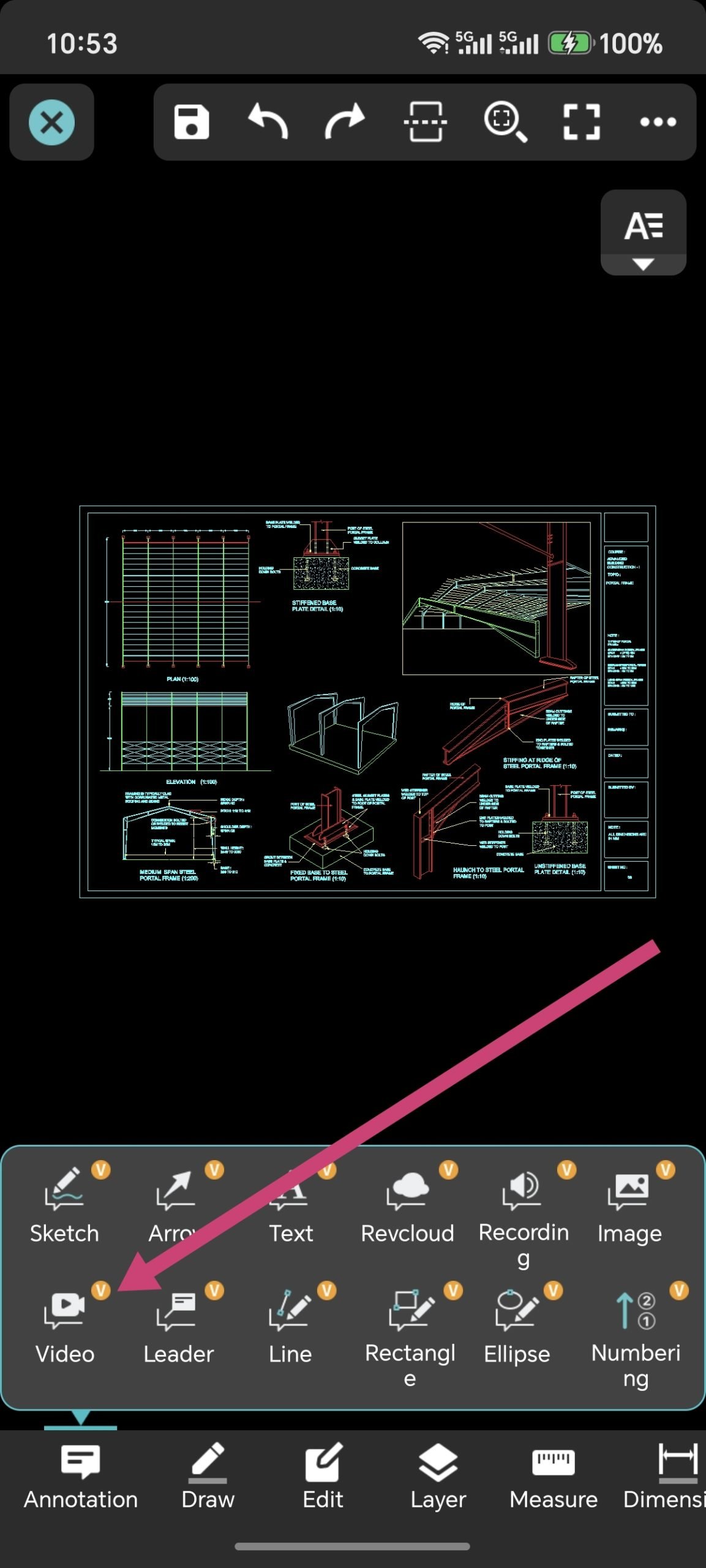
Step 2: 打開 the Annotation Toolbox
輕敲 the "Annotation Toolbox" icon located in the bottom or side toolbar to ex泛d your markup options.
Step 3: 選擇 "Video Annotation"
Find 和 tap the new "Video Annotation" icon from the toolbox.
Step 4: Choose the Location Point
輕敲 on the 繪畫 to 選擇 the exact point w這裡 you want to insert your video (e.g., a cracked corner, a pipe that needs relocation, or a quality inspection spot).
Step 5: Grant Camera Permissions & Record (Up to 1 Minute)
• If it is your first time using 這 feature, the system will prompt you to allow camera 和 microphone access. 輕敲 "Allow" to proceed.
• The camera interface will open automatically. Start recording the live conditions of the site.
• Pro Tip: 您可以 record a video for up to 1 minute, giving you plenty of time to show details from multiple angles 和 add voice explanations.
Step 6: Save 和 Pin Your Video Markup
Once you finish recording, preview the video. If everything looks 好, tap "OK". A video markup icon will be instantly pinned to your 選擇ed 協調 on the 繪畫. Check the whole process by watching 這 Youtube video guide.
Although DWG FastView provides free trial for the video 註解 feature, but you can only use it free 10 minutes. if you want to unlock all features & re移動 all ads, please click the button below to 升級 your DWG FastView account on mobile phone. If you want to 升級 on PC, click 這裡.無論您在手機應用程式或Web上升級您的帳戶,VIP 帳戶都是一樣的,並且可以在不同的裝置、手機、Windows 和Web瀏覽器上使用。

相關文章推薦
讀者留言與技術討論
✍️ 發表您的留言
您的電子郵件地址絕不會被公開顯示。標有 * 的欄位為必填項。