
如何使用 DWG FastView 測量斜坡
DWG FastView is a simple CAD tool for working with CAD files. It does NOT directly calculate "slope" (whether as a percen標籤e or a ratio) but you can 測量角度s 和 線s free 和 then calculate the slope on your own.
In CAD software, we usually get angles or the lengths of two sides first—then we convert these values to the slope we need through simple calculations. Let’s break 這 down step by step.
步驟 1:開啟您的 圖紙 檔案
開啟 DWG FastView(在電腦或手機上)。
步驟 2:量測角度 (斜率計算的關鍵)
由於我們使用角度來尋找斜度,因此請依照這些步驟來量測斜面的角度:
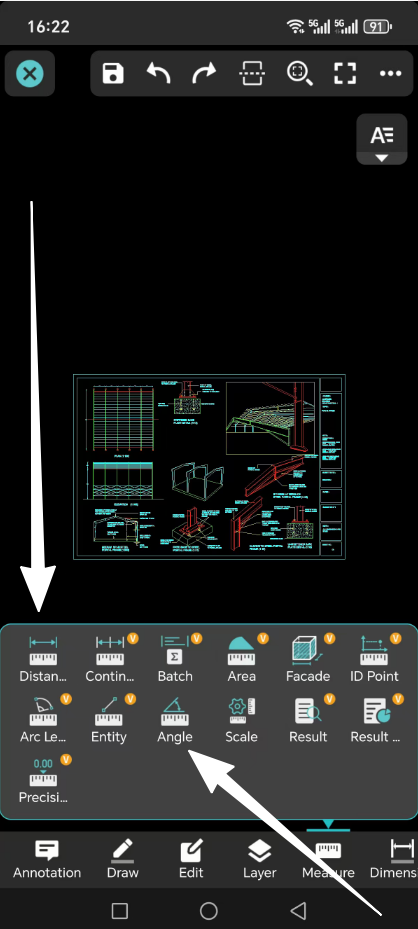
At the top, click the “Measure” tab.
Choose the “角度” tool (looks 喜歡 a small angle symbol: ∠).
遵循這些點擊:
按兩點設定水平線(例如斜面的底邊)。
按一下第三點,標示斜線(例如斜面的上緣)。
The tool will show the angle in degrees (喜歡 30°). Write 這 number down—it’s what you’ll use to calculate slope.
步驟 3:計算斜率(2 種方法,附範例)
使用您量測的角度,以兩種常見的形式找出斜率:百分比或比率。
方式一 :以百分比計算斜率
公式:
Slope percen標籤e = tan(angle) × 100%
範例:
If your 措施d angle is 30°:
Use a calculator to find “tan(30°)” (most phones or computers have a “tan” button).
tan(30°) ≈ 0.577
乘以 100% 得到斜率百分比:
0.577 × 100% = 57.7%
因此斜率約為 57.7%
方式二 :以比率計算斜率
公式:
斜率 = 1 : (1 / tan(angle))
範例:
Using the same 30° angle:
First, find “tan(30°) ≈ 0.577” (just 喜歡 before).
Calculate “1 / tan(angle)”:
1 / 0.577 ≈ 1.732
寫成比例:
1 : 1.732
因此斜率比約為 1 : 1.732
摘要
DWG FastView’s free angle 措施ment tool makes it easy to find slope. Remember: it doesn’t give slope directly—you just 措施 an angle, then use the simple formulas above to calculate slope percen標籤e or ratio. This works for roofs, roads, ramps和 any 其他 slanted surface in your 圖紙 files.
It is free to 測量距離 和 angle 和 then you can calculate the slope. Although DWG FastView provides free trial, but if you want to unlock all featues & re移動 all ads, please click the button below to 升級 your DWG FastView account on mobile phone. If you want to 升級 on PC, click 這裡.無論您在手機應用程式或Web上升級您的帳戶,VIP 帳戶都是一樣的,並且可以在不同的裝置、手機、Windows 和Web瀏覽器上使用。

相關文章推薦
讀者留言與技術討論
✍️ 發表您的留言
您的電子郵件地址絕不會被公開顯示。標有 * 的欄位為必填項。