
Ciri Baharu: Imbasan Kod QR Segera untuk Log Masuk bagi Web & Windows
Working across multiple devices should be seamless. As Pandangan Cepat DWG accounts are fully synchronized across Mobile, Web, and Windows desktop versions, we know that switching between your phone and your computer is a huge part of your daily workflow.
However, logging into computer platforms traditional ways can often slow you down: typing long email addresses and passwords leads to frequent typos, while third-party logins (like Google Sign-In) often require multi-step browser authorizations.
To eliminate these friction points, we are excited to introduce a powerful new feature: Instant QR Code Scan-to-Login!
Why You Will Love QR Code Scan-to-Login
While QR code login is already wildly popular in Asian tech hubs for its unrivaled speed, we are bringing this effortless experience to our global community!- Lightning Fast: It is officially the fastest way to log in. No typing, no waiting for redirected authorization pages.
- Zero Typos or Forgot Passwords: Never worry about mistyping complex passwords or losing account credentials on desktop browsers.
- Seamless Security: Leverage your already-logged-in mobile app to safely authorize desktop sessions in a single second.
How to Use QR Code Login (Step-by-Step)
Logging into Pandangan Cepat DWG Web or Windows desktop is now as easy as taking a photo: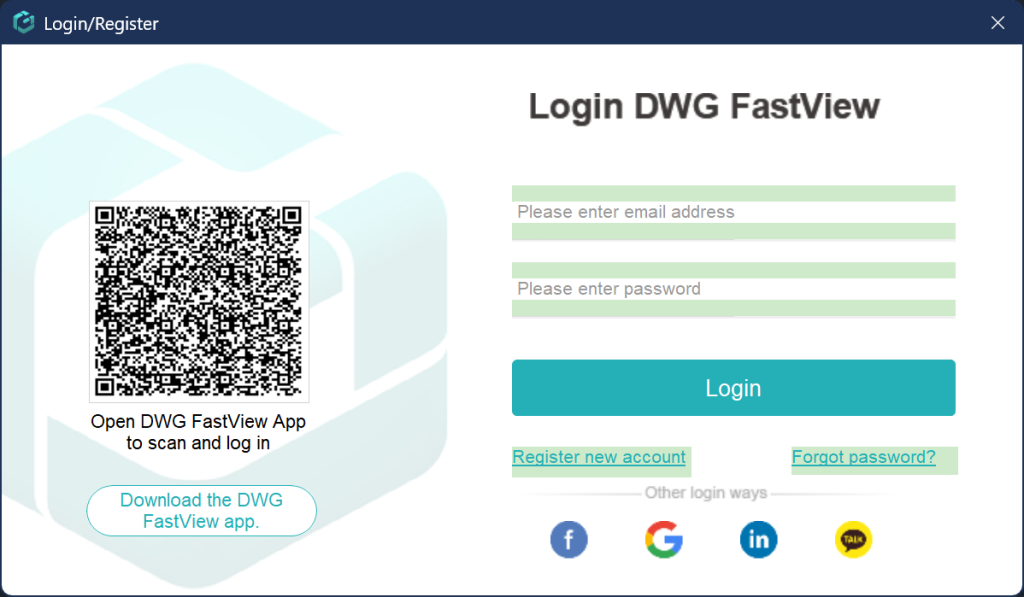
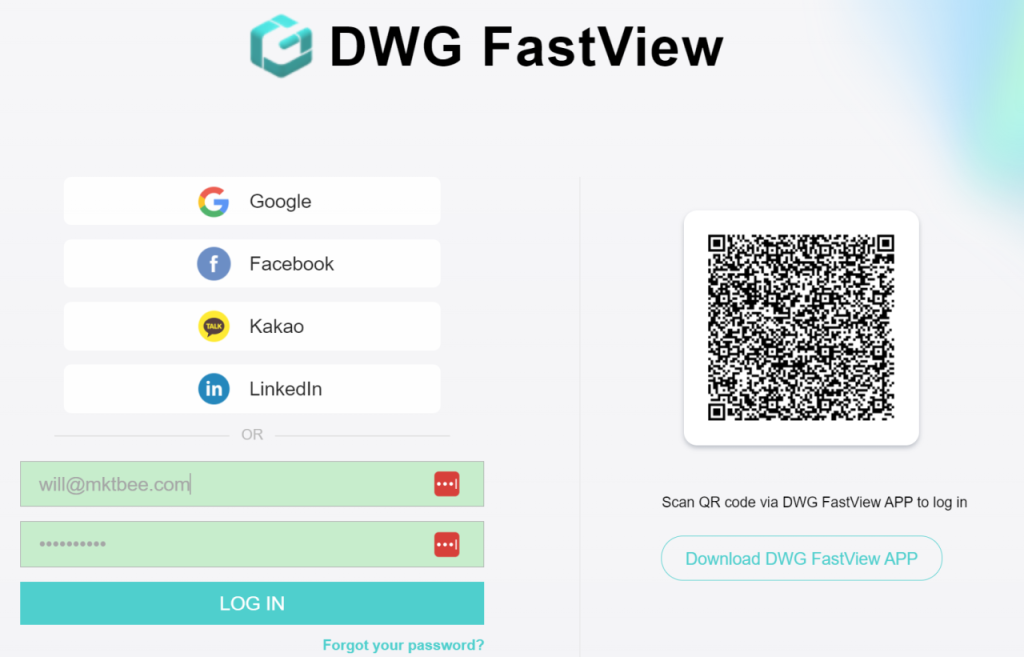
- Open the halaman log masuk on Pandangan Cepat DWG Web or the Windows App — you will see a unique login QR code on the screen.
- Open your Pandangan Cepat DWG Mobile App (make sure you are logged in on your phone).
- Tap the QR Scanner tool in the app, point your camera at the computer screen, and confirm login!
That’s it — you’re instantly logged in and ready to work on your lukisan CADs!
Try It Out Today!
Say goodbye to forgotten passwords and tedious multi-step logins. Update your Pandangan Cepat DWG Mobile App to the latest version today, open Web or Windows, and experience the speed of Scan-to-Login!Although Pandangan Cepat DWG provides free trial for the video penjelasan feature, but you can only use it free 10 minutes. if you want to unlock all features & remove all ads, please click the button below to upgrade your Pandangan Cepat DWG account on mobile phone. If you want to upgrade on PC, click di sini. Di mana sahaja anda menaik taraf akaun anda pada apl mudah alih atau di web, akaun VIP adalah sama dan boleh digunakan merentas peranti, Mudah Alih, Windows dan penyemak imbas web.

Artikel Berkaitan
Comments & Discussion
✍️ Leave a Reply
Your email address will not be published. Required fields are marked *