
日本語版 | 原文: 英語
英語に切り替え → 新機能:WebおよびWindows用のインスタントQRコードスキャンからログイン
複数のデバイス間での作業はシームレスでなければなりません。DWG FastViewアカウントは、モバイル、Web、およびWindowsデスクトップの各バージョンで完全に同期されているため、携帯電話とコンピューターの切り替えは日常のワークフローの大きな部分を占めていることがわかります。
ただし、従来の方法でコンピュータープラットフォームにログインすると、速度が低下することがよくあります。長いメールアドレスとパスワードを入力すると、誤字脱字が頻繁に発生しますが、サードパーティのログイン( Googleサインインなど)では、多くの場合、複数ステップのブラウザ認証が必要になります。
これらの摩擦点を排除するために、強力な新機能を導入することを楽しみにしています:インスタントQRコードスキャンからログイン!
QRコードスキャン・トゥ・ログインが気に入る理由
While QR code login is already wildly popular in Asian tech hubs for its unrivaled speed, we are bringing this effortless experience to our global community!- 超高速:公式にはログインする最速の方法です。入力も、リダイレクトされた認証ページの待ち時間もありません。
- 入力ミスゼロまたはパスワードを忘れた場合:デスクトップブラウザで複雑なパスワードを誤って入力したり、アカウントの認証情報を失ったりする心配はありません。
- シームレスなセキュリティ:すでにログインしているモバイルアプリを活用して、デスクトップセッションを1秒で安全に承認します。
QRコードログインの使い方(ステップバイステップ)
Logging into DWG FastView Web or Windows desktop is now as easy as taking a photo: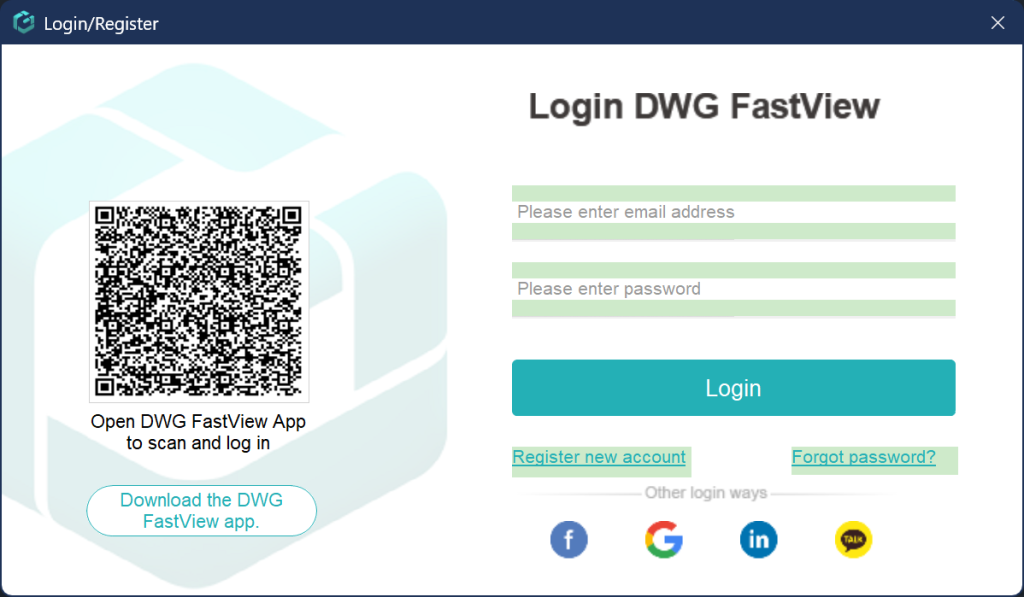
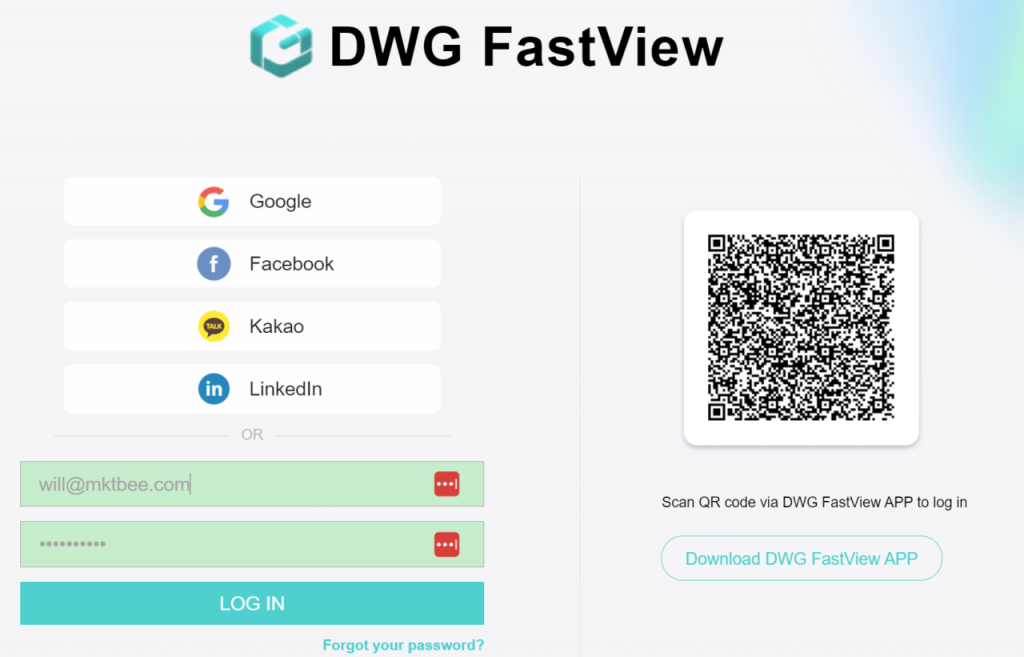
- 次の場所でログインページを開きますDWG FastView Webまたは Windowsアプリ —画面に一意のログイン QRコードが表示されます。
- あなたのを開きますDWG FastViewモバイルアプリ ( DWG FastViewスマートフォンでログインしていることを確認してください )。
- をタップします。QR コードスキャナーアプリのツールを使用して、カメラをコンピュータの画面に向け、ログインを確認します。
これで完了です。すぐにログインして、CAD図面を作成する準備ができました!
今日試してみてください!
Say goodbye to forgotten passwords and tedious multi-step logins. Update your DWG FastView Mobile App to the latest version today, open Web or Windows, and experience the speed of Scan-to-Login!DWG FastViewはビデオアノテーション機能の無料トライアルを提供していますが、10分しか無料で使用できません。すべての機能のロックを解除してすべての広告を削除したい場合は、下のボタンをクリックして携帯電話のDWG FastViewアカウントをアップグレードしてください。PCでアップグレードする場合は、ここをクリックしてください。モバイルアプリまたはウェブ上のどこでアカウントをアップグレードしても、VIPアカウントは同じであり、デバイス、モバイル、Windows、ウェブブラウザで使用できます。

タグ:
#QR code login
← 前の記事 DWG FastViewがさらに14の3DフォーマットとSolidWorksおよびCATIA描画サポートを追加 次の記事 → 広告に別れを告げる:DWG FastViewは$0.99の広告なしプランを開始します!
関連記事
DWG FastView for Windows / Webが正式にリリースされました Sep 4, 2020 Google 経由で登録した場合、DWG FastView for Windows にログインするにはどうすればよいですか? Mar 9, 2023 Hatch ToolがDWG FastView Mobileに登場— 100%無料! Jul 24, 2026 DWG FastView for Windowsをダウンロードします。 Feb 25, 2025 DWG FastView for Windows バージョン 7.7 アップデート: 多言語インターフェイスをサポート Mar 18, 2024 DWG FastView for Windows のさらなるメジャー アップデート Feb 19, 2024
💬
コメントとディスカッション
E
Entajul Mollick
Shoba mep work
H
Hamza
Account
M
Muhammad Bilal
Best App For Auto Cad Dwring
R
Ramesh Chandra
So Nice app
R
Raju Kumar
Do I have to pay every month?”
A
Alemu
Access all
A
Alemu
Access all feature
S
Shewalem delkero
How to get x , y, z values from this dwg app? we can't find for our lay out dwg.
B
Bujor Victor
Bună ziua, cum pot schimba in limba română, am încercat dar nu reușesc!
Mulțumesc!
A
Akshay Kumar
Akshay Kumar Sharma
E
Entajul Mollick
Entajul mollick
Sobha company work
I requested my drowing open
T
Tony Kalita Ishabor
Nice innovation
E
Entajul Mollick
Good plan
M
M.AYOUB SHEIKH.
I have lost some important files in this app how can I recover them
F
Fh
Qw da başka da bir o kadar çok şey değişti ve en uygun fiyatlarla
V
Vasu
It's nice
U
Ubaid
Raily full dwaraing
L
Le Wuang
Le quang
K
Kajuna
Easy to use
A
Amit Nishad
Plan dekhna hai
J
Joy roy
Yes baby
✍️ コメントを投稿する
メールアドレスが公開されることはありません。* は必須項目です。